
The free PayGate.to module for Magento 2 adds two crypto payment options. Every payment is forwarded to your own wallet the moment it's confirmed. Fees: 1% plus blockchain fees. Illustrated guide: Magento crypto module page.
Requirements
Magento 2.4.4 or newer with PHP 7.4 or 8.1 to 8.5; works with the default Luma checkout.
Install
With Composer (recommended):
composer config repositories.paygate-crypto vcs https://github.com/paygate-to/Magento-Crypto-Payment-Gateway
composer require paygate/module-crypto-payment:dev-main
bin/magento module:enable PayGate_CryptoPayment
bin/magento setup:upgrade
bin/magento setup:di:compile
bin/magento setup:static-content:deploy
bin/magento cache:flush
Or copy the files to app/code/PayGate/CryptoPayment/ and run the same bin/magento commands.
Configure
Stores › Configuration › Sales › Payment Methods › PayGate.to Crypto Payments. Two options, each enabled on its own:
| Option | How customers pay |
|---|---|
| Individual coins | They pick a coin at checkout and pay a QR code on your order confirmation page |
| Multicoin | They pick any coin on the hosted multi-coin page |
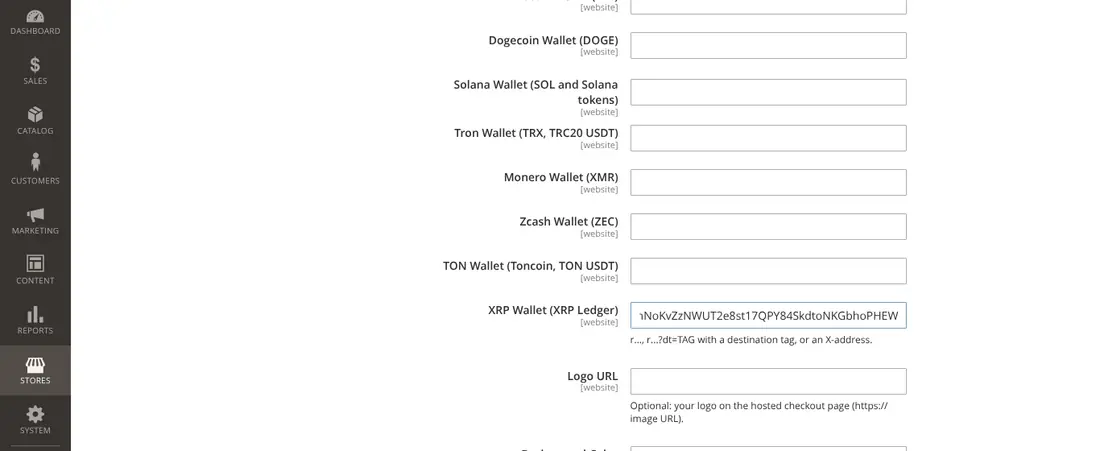
An option stays hidden at checkout until it has at least one wallet. Optional: your dedicated endpoint in API Domain, a custom checkout domain, logo and colours.
How orders are handled
- The payment is created at Place Order; if PayGate.to can't be reached or the total is below the coin's minimum, the order isn't placed and the customer sees a clear message.
- New orders get Awaiting crypto payment; the confirmation page and email show the amount, address and a payment link.
- The quoted coin amount is honoured for 3 hours.
- Paid: invoiced, Processing, invoice email sent.
- Underpaid: On Hold; the customer can send the rest to the same address and both payments are added up.
- Cancel Unpaid Orders After (default 48 hours) releases stock for unpaid orders.
- The callback URL
/paygatecrypto/callback/indexmust be reachable: no password, IP allow-list or maintenance mode in front of it.
Coin guides for Magento
Monero · XRP · Bitcoin · USDT · USDC
Frequently asked questions
Where's the log?
var/log/paygate_crypto.log, and the admin order page shows payment details including the IPN token for support.
Does it support multiple store currencies?
Yes, as long as PayGate.to can price the currency; otherwise the order can't be placed with crypto.