
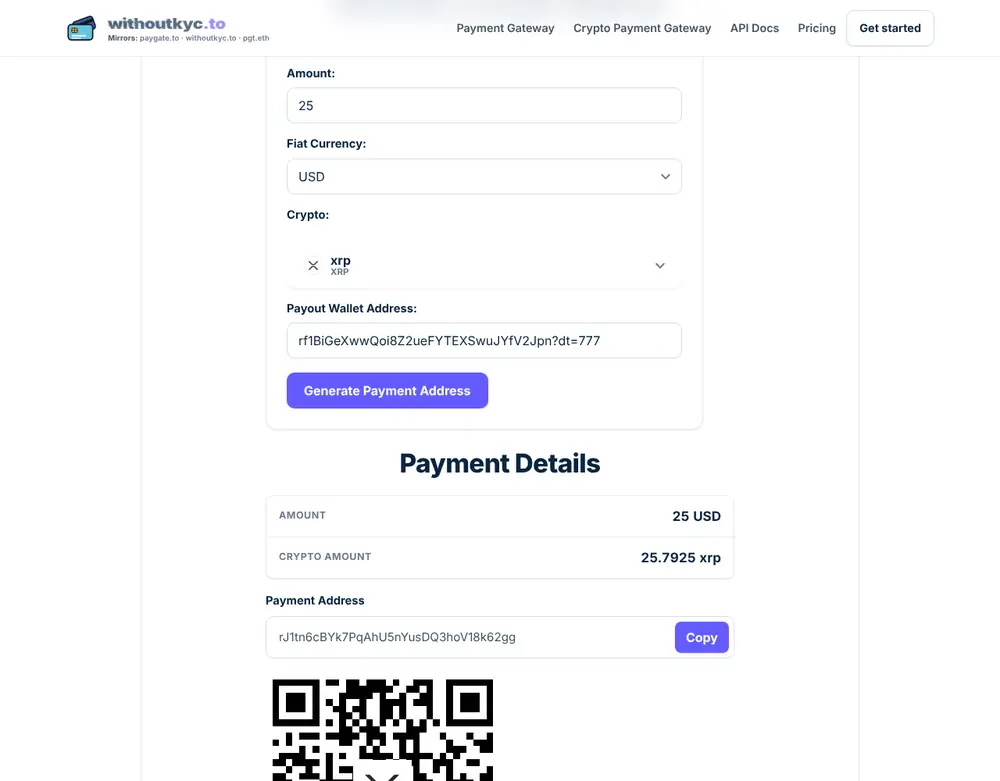
XRP addresses start with r (like rf1BiGeXwwQoi8Z2ueFYTEXSwuJYfV2Jpn). Some XRP accounts are shared by many people, so payments also carry a destination tag: a number that says who inside that account the payment is for. PayGate.to supports XRP payouts with or without a tag, and also accepts X-addresses, which pack the address and tag into one string.
Do you need a destination tag?
| Your XRP payout wallet | Tag needed? |
|---|---|
| Your own self-custodial wallet (Trust Wallet, OKX Web3 Wallet, a hardware wallet) | No. The r… address alone is yours. |
An account where several people share one r… address (typical of custodial services) | Yes. Without your tag the funds may not be credited to you. |
For payouts we recommend your own self-custodial wallet, which needs no tag. See Why you shouldn't use an exchange deposit address for payouts.
How to get your XRP address
In a self-custodial wallet, open Receive and choose XRP on the XRP Ledger network:
- Trust Wallet: Receive → search "XRP" → QR icon → Copy.
- OKX Web3 Wallet: Receive → search "XRP" → pick XRP · XRP Ledger, not a copy of XRP on another network.
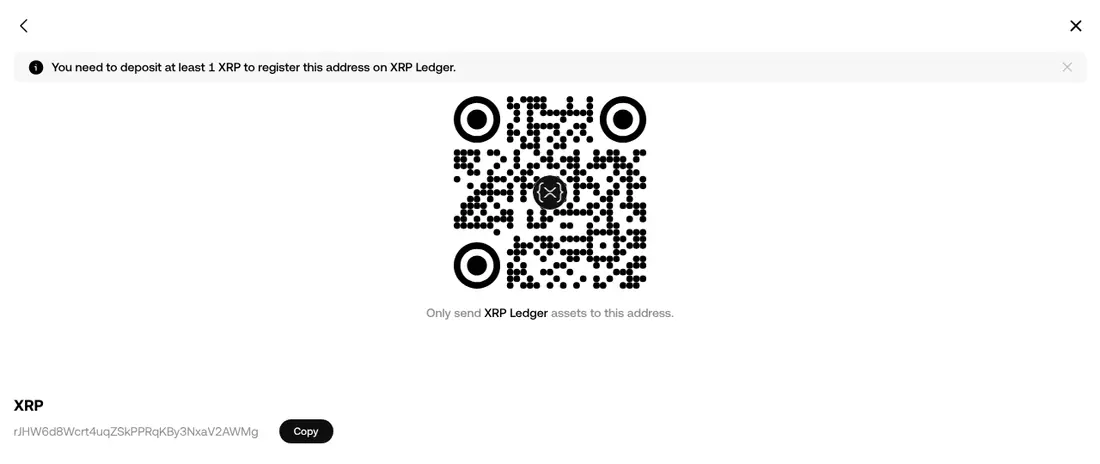
The 1 XRP reserve
An XRP address only exists on the ledger after it receives the base reserve, currently 1 XRP, which stays locked in the account. PayGate.to's minimum XRP payment is higher than that (2 XRP at the time of writing, see the live minimums), so your first payout activates a new address automatically.
Writing the address with a tag: r…?dt=TAG
If your account needs a tag, enter the address followed by ?dt= and the tag number:
rf1BiGeXwwQoi8Z2ueFYTEXSwuJYfV2Jpn?dt=777- The tag is a whole number from
0to4294967295. - In an API request, URL-encode it:
address=rf1BiGeXwwQoi8Z2ueFYTEXSwuJYfV2Jpn%3Fdt%3D777. Plugins do this for you. - Leave
?dt=…out entirely when you don't need a tag. Don't invent one.
X-addresses
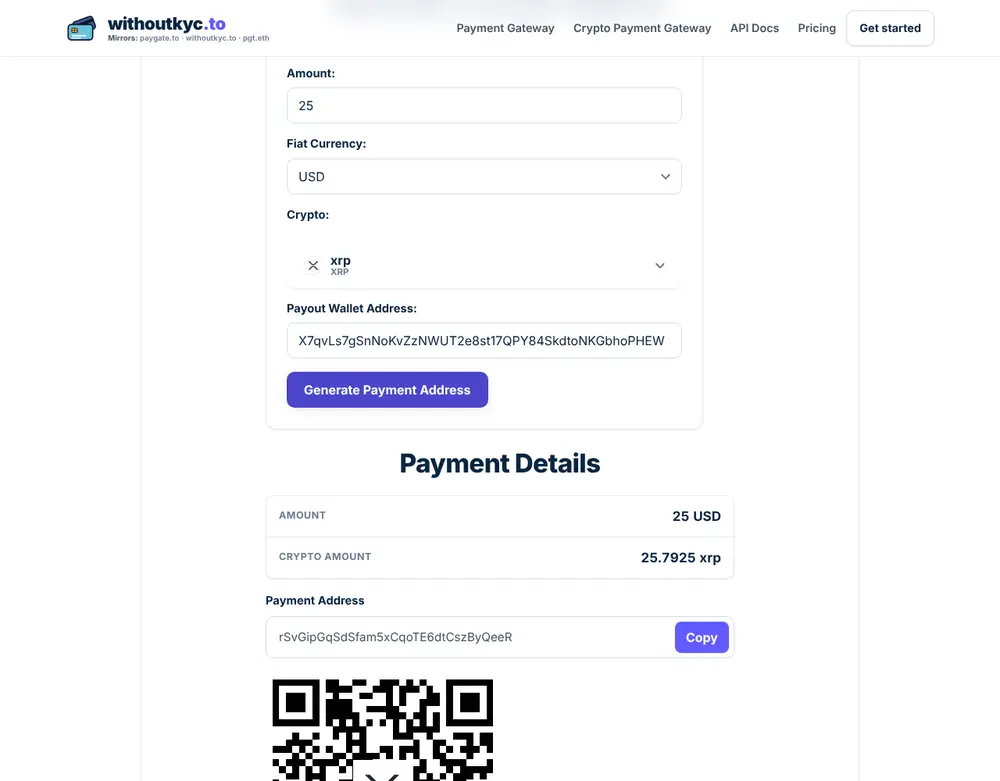
An X-address (starting with X on mainnet) encodes the classic r… address and the tag in one string, so the tag can't be forgotten. PayGate.to accepts X-addresses anywhere it accepts an XRP wallet: we tested X7qvLs7gSnNoKvZzNWUT2e8st17QPY84SkdtoNKGbhoPHEW, which is rf1BiGeXwwQoi8Z2ueFYTEXSwuJYfV2Jpn with tag 777.
Here are both forms in PayGate.to's own crypto forwarding address generator:
How your XRP payout appears in callbacks
In the payment callback, address_out lists the payout wallets. For XRP the key is always the classic address with the tag in PayGate.to's form, for example rf1BiGeXwwQoi8Z2ueFYTEXSwuJYfV2Jpn?dt=777, even if you configured an X-address. An X-address is never echoed back.
If your code compares address_out with the wallet you configured, convert X-addresses first. The official SDKs do it for you: XrpAddress::payoutForm() in the PHP SDK and xrpPayoutForm() in the Node.js SDK. See XRP payment API.
Frequently asked questions
What happens if I forget the tag for a shared account?
The XRP reaches the shared account but the service may not know it's yours. Recovery depends entirely on that service. With your own wallet you don't have this problem.
Is a destination tag the same as a memo?
No. A memo is free text attached to a transaction; a destination tag is a number the receiving account uses to route payments. PayGate.to uses destination tags.
Can I use an X-address that starts with T?
No. T… X-addresses belong to the XRP test network, and test XRP has no value. Use a mainnet X-address (X…) or your r… address. Note that TRON addresses also start with T; they're unrelated.
Do I need XRP in my wallet before the first payout?
No. The first payout (at least 2 XRP) creates and funds the account.