
WooCommerce shops can offer XRP two ways: on the hosted multi-coin page, or as an individual coin with a QR code on your own site. XRP settles in seconds with tiny fees. PayGate.to supports native XRP on the XRP Ledger: each order gets a one-time XRP address (no tag needed by the customer), and the XRP is forwarded to your own wallet, including your destination tag if your account needs one.
Step 1: Get an XRP wallet address
You need an XRP address you control (r…), from Trust Wallet or OKX Web3 Wallet. If your account needs a tag, write it as r…?dt=TAG or use an X-address. Details: Get an XRP address with a destination tag.
Step 2: Install or update the WooCommerce plugin
In WordPress, go to Plugins › Add Plugin, search for Crypto Payment Gateway with Instant Payouts, then Install Now and Activate. Already installed? Update it under Plugins first (XRP needs version 1.2.3 or newer).
Step 3: Paste your XRP wallet
Open WooCommerce › Settings › Payments.
- Multicoin Crypto Payment Gateway: paste your XRP wallet into XRP Wallet Address (XRP Ledger) and save. Customers choose XRP on the hosted page.
- Individual Coin Crypto Payment Gateway: click Manage, find XRP in Accepted Coins, tick it and paste the same wallet. Customers pay a QR code on your own site.

Step 4: What your customer sees
The customer chooses XRP, gets the exact amount converted from your order total, a one-time address and a QR code.
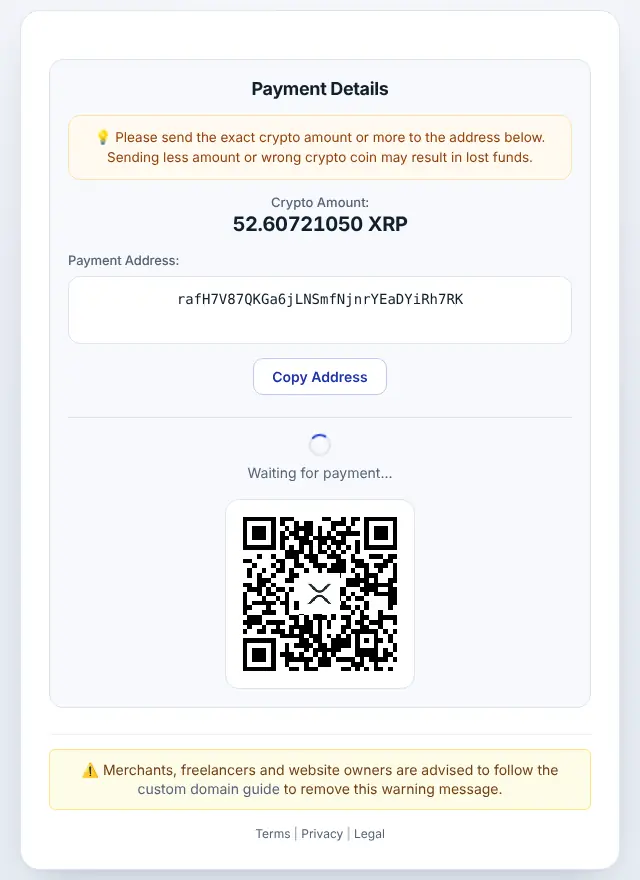
Step 5: Order completed automatically
When the payment is confirmed, the XRP is forwarded to your wallet and the order moves to Processing (or Completed for virtual products). The order notes show the amount and transaction ID.
XRP on WooCommerce: good to know
- Minimum: 2 XRP at the time of writing (live minimums). A new address needs 1 XRP reserve; the first payout covers it.
- Timing: XRP Ledger payments are final in a few seconds.
- Callbacks:
address_outlists your payout asr…?dt=TAG, even if you entered an X-address. - If the method doesn't appear at checkout, check that the coin is both ticked and has a wallet (Individual) or that at least one wallet is filled (Multicoin).
- The QR page needs Settings › Permalinks set to anything except "Plain", and WordPress at the domain root.
- Orders that stay Pending usually mean
/wp-json/is blocked or cached. See WooCommerce troubleshooting. - Order statuses: Pending payment → Processing/Completed; Failed if less than required arrived (a note shows the amounts).
Frequently asked questions
Do customers need to enter a destination tag?
No. They pay a one-time address without a tag. Only your payout wallet may have one.
Can I paste an X-address into the field?
Yes. The plugin accepts r…, r…?dt=TAG and mainnet X-addresses.
Do I need an account or API key?
No. The plugin only needs your public wallet addresses. Neither you nor your customers register with PayGate.to.
Which other platforms support XRP?
Easy Digital Downloads · WHMCS · FOSSBilling · Magento · OpenCart · PrestaShop · Paymenter. See Accept XRP payments for the overview.